Create a Wallet
Understand wallet control, addresses and account ownership before creating or importing an account.
Start here →
imtoken · Multi-chain Wallet
A multi-chain wallet, blockchain network and Web3 knowledge hub from imtoken
Use one learning path to understand multi-chain assets, network selection, receiving and sending, DApp connections, approvals and wallet security. imtoken connects practical wallet actions with the network concepts behind gas, confirmations, transaction hashes and smart-contract permissions.
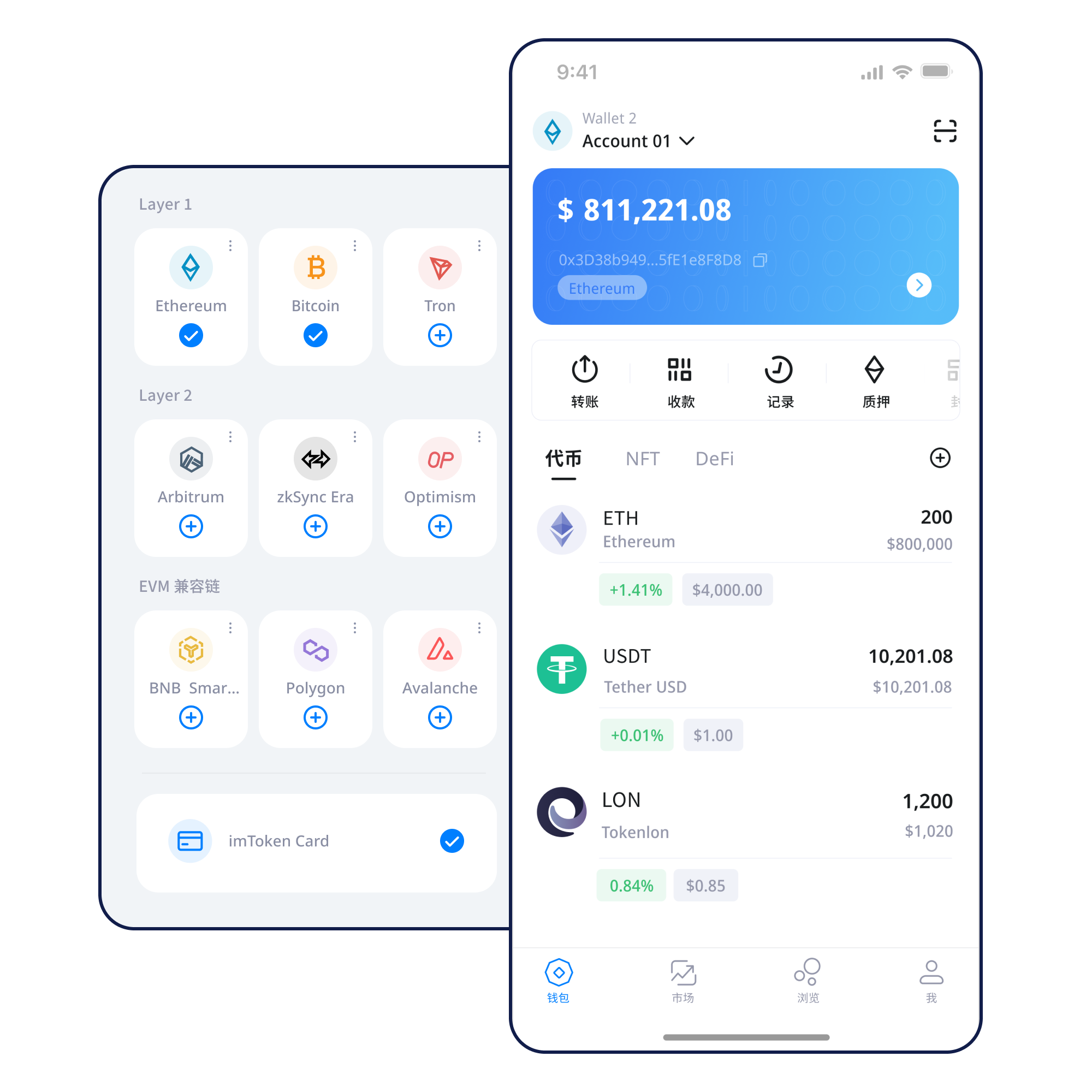
Understand wallet control, addresses and account ownership before creating or importing an account.
Start here →Keep the seed phrase offline and avoid screenshots, chat apps or shared cloud storage for secret material.
Backup principles →Confirm the receiving network before sharing an address; address format alone does not identify the chain.
Receiving flow →Review address, network, amount and gas before submission, then keep the transaction hash.
Sending checks →Verify the domain and account request before reviewing signatures, transactions and token approvals.
Connection guide →Asset display, network selection, transaction confirmation and permission safety are easier to understand when they are connected to real operating steps instead of treated as interchangeable feature blocks.
Multi-chain Assets
Similar address formats can exist on different chains, while balances, gas assets and transaction histories remain network-specific. Verify the chain before the address and amount.
Understand multi-chain networks →
imtoken App
Review network context, balances and history in one mobile flow. Every DApp signature or approval still deserves an independent decision.
Explore the app →Send & Receive
Build checks from the receiving address through final network confirmation instead of relying on a single success message.
Learn the transfer flow →imtoken Web
A connection creates a session; it is not blanket approval for everything that follows. Review account scope, signatures and spenders.
Understand web connections →
Wallet Security
Official personnel will not request a seed phrase, private key or verification code. Keep backups offline and avoid entering secret material on shared devices or unknown pages.
Open the security center →Understand the role that public chains, EVM networks, Layer 2 systems, gas and confirmations play in wallet activity. All network explanations remain readable even when interactive enhancements are unavailable.
Each blockchain maintains its own state. Verify source and destination networks and understand whether a bridge or another protocol is involved.
Read more →Distributed nodes maintain the ledger and transactions gain confirmations as they enter blocks. A block explorer verifies records but cannot decide whether your intended destination was correct.
 Read more →
EVM-compatible chains can share familiar address and contract patterns while keeping separate state, gas assets and deployments.
 Read more →
Layer 2 systems use different mechanisms to increase capacity while settling or proving results relative to a main chain. Cross-layer transfers can involve bridges and waiting periods.
 Read more →
Gas reflects network resource use. After submission, use the transaction hash to interpret pending, successful or failed states.
Read more →Six steps connect daily actions with security checks. If a request cannot be explained, stopping is a valid choice.
Enter through the official download page and initiate downloads yourself.
Understand account control and handle key material only in a trusted local environment.
Keep the seed phrase offline and never disclose private keys or verification codes.
Confirm the asset's chain, the gas asset and the network context of the address.
Review address, network and amount. For unfamiliar flows, a small test can be considered according to your own circumstances.
Keep transaction hashes, review DApp signature details and remove permissions you no longer need.
Web3 & DApps
A wallet connection is only one part of a session. Asset or permission changes usually come from later transactions, message signatures, contract calls or token approvals. Connecting a wallet does not mean you should approve every request.
Open the Web3 guide →Security
Wallet security is not a single switch that stays effective forever. You keep control of the seed phrase and private keys; official personnel will not request them. DApps and smart contracts are third-party environments whose permissions should be reviewed independently. Every transfer should be checked for address, network and amount, and sensitive activity deserves extra caution on shared devices, public networks or remote-control sessions. Because confirmed on-chain transactions are generally not something a wallet can reverse by itself, the strongest protection often happens before approval.
Open Security CenterStart with the concepts a first-time wallet user needs and connect addresses, networks, gas, transaction hashes, DApps and approvals into one learning route.
A wallet is not a container that physically holds assets. It manages key material used to control accounts and reads state from blockchain networks. Before acting, learn what an address, seed phrase, private key, network, gas, transaction hash, DApp and token approval means.
Read the full guide →Learn about validators, reward sources, exits and risk without fixed-return or risk-free language.
Ethereum Staking Basics
Ethereum PoS uses validators to participate in consensus. Rewards come from protocol rules and validator performance, while network state and exit queues can affect timing.
Learn about Ethereum staking →Product notes, network reminders, security guidance and service notices are organized around useful content. When no verified date exists, no specific date is invented.
Resolve common wallet, EVM, Layer 2, signature and Ethereum PoS misunderstandings before moving into advanced guides.
Asset records live on the relevant blockchain. A wallet manages account control and reads network state.
No. Official personnel will never ask for a seed phrase, private key or verification code.
Similar address formats can exist on different networks while assets, gas and transaction state remain separate.
It can be used in a block explorer to verify transaction status, block inclusion and fees.
No. Connection, signatures, transactions and token approvals are separate requests.
It grants a broader allowance scope and requires stronger review of the spender and ongoing necessity.
No. Rewards, network state, exit timing and asset prices can all change.
Cross-layer flows may involve bridges, batched settlement or network confirmations.
All download actions enter the imtoken download page.